External FX
Bitbox Micro Firmware: External FX
Your own effects on the delay and reverb sends, a return, and dub throws.
Use your own effects as the Bitbox's delay and reverb. External FX turns each pad's delay and reverb sends into a send and return: the sends go out on an output of your choice to a spring reverb, a tape echo or a pedal, and the effect comes back on In 1/2 into the mix. Dub Throws open a pad's send fully from a gate or a MIDI button, for the classic dub move.
The rows on the Settings page are module settings, kept through a power-off. Dub Throw is a pad setting, and it saves with the preset.
1Before You Start
Here is a reverb on Aux, from scratch:
- Patch outputs 5 and 6 to your reverb's inputs, and its outputs to inputs 1 and 2.
- Set inputs 1 and 2 to Audio on the module's Input screen: push TOOLS twice and select each input.
- Press TOOLS once for the Settings page, and scroll past Theme. Set Reverb Mode to AUX and Return to MIX. Reverb Out is already Out5/6.
- Turn up a pad's reverb send.
The reverb you hear is now yours. The module's own reverb is switched off, which frees CPU for the Character chain.
2The Settings
These rows follow Theme on the Settings page, in this order. Turn the top knob to pick a row and the bottom knob to change it.
Delay Mode:   EFFECT / AUX / BOTH
Delay Out:    Out3/4 / Out5/6 / Out7/8 / Out3 to Out8
Reverb Mode:  EFFECT / AUX / BOTH
Reverb Out:   Out3/4 / Out5/6 / Out7/8 / Out3 to Out8
Aux HP:       OFF / 60 Hz to 1.2 kHz
Aux Mono:     L+R / LEFT / RIGHT
Return:       OFF / MIX / DELAY / REVERB
Return HP:    OFF / 60 Hz to 1.2 kHz
Return Lvl:   -60.0 dB to +6.0 dB
Delay Mode and Reverb Mode
Choose where each effect's sends go.
| Mode | The sends go to |
|---|---|
| EFFECT | the module's own effect, as in stock firmware. This is the default. |
| AUX | the output you choose below, and the module's effect switches off |
| BOTH | both, so your effect and the module's run side by side |
Delay Out and Reverb Out
Choose the output for each effect's sends, from the same list as a pad's Output. A pair, such as Out3/4, is stereo. A single output, Out3 to Out8, is mono, and Aux Mono sets how the stereo send folds into it. Delay Out starts on Out3/4 and Reverb Out on Out5/6, so each effect can feed a different external effect.
Aux HP and Aux Mono
Aux HP cuts the low end from both sends before they leave, from 60 Hz up to 1.2 kHz, so kicks and basslines stay out of your external reverb. OFF is the default.
Aux Mono sets what a single output takes: both sides mixed (L+R, the default), or only the LEFT or RIGHT side.
Return, Return HP and Return Lvl
Return sets where In 1/2 come back.
| Return | In 1/2 join |
|---|---|
| OFF | nothing. This is the default. |
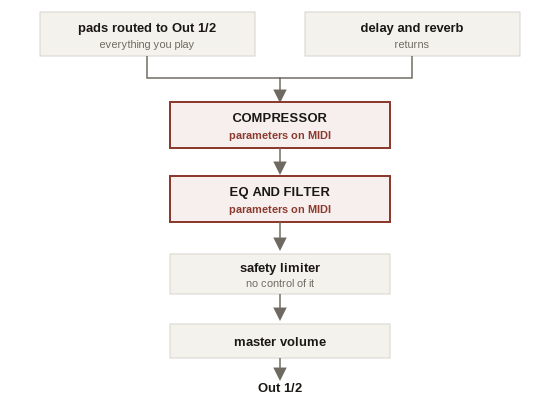
| MIX | the mix, before the Character chain, the EQ and filter and the compressor |
| DELAY | the mix, and the module's own delay, so it echoes your effect |
| REVERB | the mix, and the module's own reverb, so it tails your effect |
DELAY and REVERB need that effect on EFFECT or BOTH. On AUX the module's effect is off, so they act as MIX.
Return HP cuts the low end from the return, with the same choices as Aux HP. It acts on the mix and on the module's delay or reverb alike.
Return Lvl sets the return's level, from -60.0 dB to +6.0 dB in tenths of a dB. It starts at +0.0 dB. CC 63 on channel 1 sweeps it too.
3Dub Throw
Use Dub Throw to open a pad's send fully, for as long as a gate is high or a button is held. Let go and the send drops back to its knob, while the echoes ring on. A throw follows Delay Mode and Reverb Mode, so on AUX it goes to your external effect.
By Gate
Dub Throw is on the pad's Main Parameters page, below Rec In.
| Dub Throw | While the gate on that input is high |
|---|---|
| Off | nothing. This is the default. |
| Del 1 to 8 | the delay send opens fully |
| Rev 1 to 8 | the reverb send opens fully |
| D+R 1 to 8 | both sends open fully |
Put a gate on the last beat of every bar, and the snare on that pad flies into the delay while the rest of the bar stays dry. Gates and CV covers the inputs.
By MIDI
On the pad's own MIDI channel, CC 103 throws the delay and CC 106 throws the reverb. Send 64 or more to throw and less than 64 to let go, so set each up as a momentary button. Hold both to throw both. Each press opens a DUB THROW pop-up. A gate and a CC together keep the send open until both let go.
4CC 63: Return Lvl
On channel 1, CC 63 sets Return Lvl in half-dB steps. 115 is 0 dB, 127 is +6.0 dB and 0 is -57.5 dB, so a fader at the bottom is nearly silent rather than off. Return switches the return on and off. The pop-up shows RETURN and the level, and the Return Lvl row follows.
5Ideas
- Real spring or plate: set Reverb Mode to AUX, patch Reverb Out into a real spring or plate, and bring it back on Return. The module's reverb switches off, which frees CPU for the Character chain.
- Parallel echoes: set Delay Mode to BOTH. The send feeds your tape echo while the module's delay keeps running, so the two blend and drift against each other.
- Dub throws: with the delay on AUX into your own echo, sequence a Dub Throw on the snare, by gate or CC, on the last beat of each bar. That hit flies into your delay, and its echoes ring out under the next bar.
- Dirty reverb: send pads out on the delay's AUX to a distortion or a filter, and set Return to REVERB. The module's reverb then tails the processed sound rather than the clean one.
- Clean lows: set Aux HP to 150 Hz, so kicks and basslines stay out of the external reverb and the low end stays tight.
6Things to Know
One Return
There is one Return, on In 1/2, for both effects. To bring two external effects back, mix them first.
The Return takes only the inputs set to Audio on the Input screen. With both on Audio it is stereo. With one, that input feeds both sides. With neither, it is silent.
While the module monitors In 1/2 itself, with Rec Mon on and Mon Output on Out 1/2, the Return steps aside so you don't hear the inputs twice. The module's delay or reverb keeps hearing them on DELAY or REVERB.
Outputs
Out7/8, and Out7 and Out8 on their own, reach no output until you map them on the module's Output screen, the third page of TOOLS. The map saves with each preset, so set it in every preset that uses them.
The outputs carry the sends alone. They skip the Character chain, the EQ and filter, the compressor and the master volume, so turning the module down leaves them as loud as before.
Switching Modes
AUX switches the module's own effect off, which frees CPU. BOTH runs both, so it frees nothing.
An effect switched back from AUX starts clean, with no old tail. Switch back straight away and it stays silent for a moment, up to about a third of a second, while it clears.
Muted Pads
Throws come after the mixer's mute, so a muted pad stays silent when its Dub Throw opens.